
DetailOAR Field Manual · Website conversion
How to Build a Detailing Website That Turns Visitors Into Leads
Build a fast, credible detailing site that answers the questions buyers actually have, shows real work, and points every visitor to one clear next step.
Save or use this guide
Contents
Start
Know the outcome.
Publish a mobile-first site where a visitor can see what you do, whether they fit, your proof, your area, your policies, and how to reach you in one pass.
Audience, time, and cost
Owners putting up their first site, or replacing a pretty brochure site that gets visits but hardly any real inquiries.
Time and costA focused one-pager can go live in a day; a full service site takes longer. Your budget covers the domain, hosting, and any professional help you bring in.
Before you start
Nail down your brand, main customer, services, service area, pricing approach, and booking rules, plus permission for every image and claim you’ll publish. Starting from zero? DetailOAR’s Website screen can generate a free one-file starter site from your real services and booking link — publish that today, then improve it with this guide.
Tools and materials
- domain
- website editor
- analytics and speed test
- service scope
- real photos with permission
- contact details
- policies
Steps
Do the work in order.
-
Step 1 Pick one main action
Decide what most good-fit visitors should do: book, request an estimate, call, or send photos. Keep one backup path for work that needs a closer look.
-
Step 2 Write the first screen
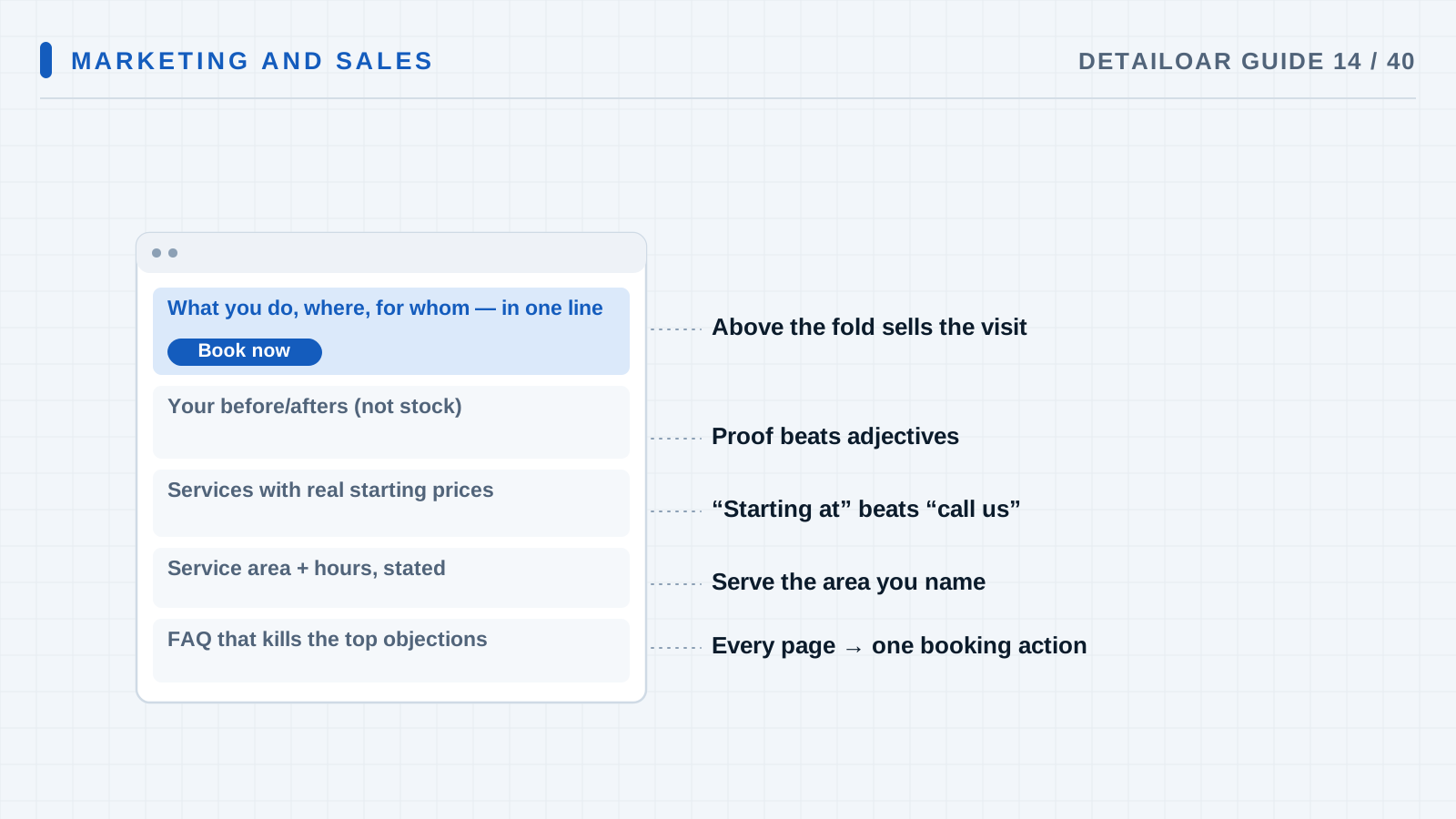
Say who you serve, what they get, where you work, and what makes you different, in plain words. Then the main button and one real photo of your work or product.
-
Step 3 Build decision sections
Cover the problems you solve, what you offer and for whom, how the work goes, real results, where you go, your policies, FAQs, and how to reach you.
-
Step 4 Give big services their own pages
Each high-value service gets its own page: the result, what’s included, what isn’t, starting price or how you quote, the process, FAQs, and related work.
-
Step 5 Make forms easy and safe
Ask only what the next step needs, label every field, make errors obvious, explain how photos and consent get used, and show a real success message.
-
Step 6 Tune for trust and speed
Compress responsive images, reserve their dimensions, self-host the fonts you need, cut autoplay and scripts you don’t, and stick to real proof.
-
Step 7 Test every path
Try small and large screens, keyboard navigation, screen-reader landmarks, tap-to-call, forms, the confirmation, analytics, links, metadata, and the 404 page.
Reference
Use the detail when you need it.
How it works
A site that converts settles doubts in the order a customer feels them: “Do you fix my problem? Do you work on my kind of vehicle? Do you come to my area? Can I trust you? What do I do next?” Polish is nice, but it only helps after those answers are fast and easy to find.
Terms used in this guide
- ConversionA visitor doing something useful, like a qualified estimate request, a call, or a booking.
- CTACall to action: the specific instruction and button that moves a visitor forward.
Common mistakes
- Opening with your life story instead of the customer’s problem.
- Posting a gallery with zero context.
- Hiding how you price and where you go.
- Pointing every ad at the homepage.
- Stacking heavy widgets before you’ve tested demand.
Troubleshooting
- Traffic shows up but the form stays quietCheck that the page matches what the ad or search promised, simplify the ask, fill in missing scope and trust answers, and submit the form yourself.
- Most leads are a bad fitSpell out service area, which vehicles you take, starting price, exclusions, and required photos before anyone reaches the form.
- The site drags on phonesShrink the hero image, drop unused scripts, cut back on fonts, lazy-load anything below the fold, and retest on a throttled connection.
Finish
Check the result and close the loop.
What good looks like
- The result and service area show up right away.
- Photos are real, licensed, properly sized, and described.
- Every CTA works.
- Forms ask for the bare minimum that’s useful.
- Pages still work at 320px and by keyboard.
- You can measure lead source and response.
Final checklist
- One primary CTA picked
- Big homepage questions answered
- Service pages done
- Real proof up, permissions on file
- Form tested
- Mobile and keyboard checks passed
- Analytics event firing
- Metadata and 404 checked
What to do next
- Link the site from your Business Profile.
- Add local internal links and helpful guide content.
- Check lead quality once a month.
More
Continue only where it helps.
Prerequisites
How to Choose a Business Name, Domain, and Brand Position12 min readHow to Design a Profitable Service Menu14 min readLearning paths with this guide
Get Your First 20 Customers9 guidesFrequently asked questions
Do I need a separate page for every service?
Give a service its own page when the customer intent is genuinely different and you have something original to say, not thin copies of one template.
Should I show prices?
Show fixed prices where you control the scope. Where condition changes the work, show honest starting ranges and explain how the inspection sets the rest.
Can I build the site myself?
Sure, if you can keep up with accuracy, accessibility, security, speed, forms, and backups. A generated starter site covers the basics on day one; when those jobs outgrow your time or skill, hire help.
Sources and review
Reviewed by DetailOAR Editorial Review on July 15, 2026. Verify current labels, interfaces, prices, and local requirements before acting.
Related field guides
 Marketing and SalesHow to Set Up and Improve a Google Business ProfileSet up an accurate, eligible Google Business Profile and keep categories, service areas, photos, services, reviews, and updates current without spammy tricks.
 Marketing and SalesLocal SEO for Detailers: A Beginner’s Step-by-Step GuideGet found locally with a technically sound site, genuinely useful service and area pages, consistent business data, honest reviews, and smart internal links.
 Marketing and SalesHow to Take Before-and-After Photos That Sell the WorkShoot consistent, honest before-and-after photos that document condition, show off real workmanship, and keep your customers’ privacy protected.