
DetailOAR Field Manual · Service catalog
Create Services, Packages, Add-Ons, and Vehicle-Size Pricing
Build out sellable services with durations, booking behavior, deposits, size prices, invoice presets, and package/add-on conventions everyone can follow.
Save or use this guide
 View full size
Contents
Start
Know the outcome.
What you will accomplish
You’ll turn the service menu into bookable or request-only records with durations you can defend, vehicle-size prices, deposits, and optional invoice preset lines. Customers and staff end up seeing the same service names.
Steps
Do the work in order.
-
Step 1 Add a service
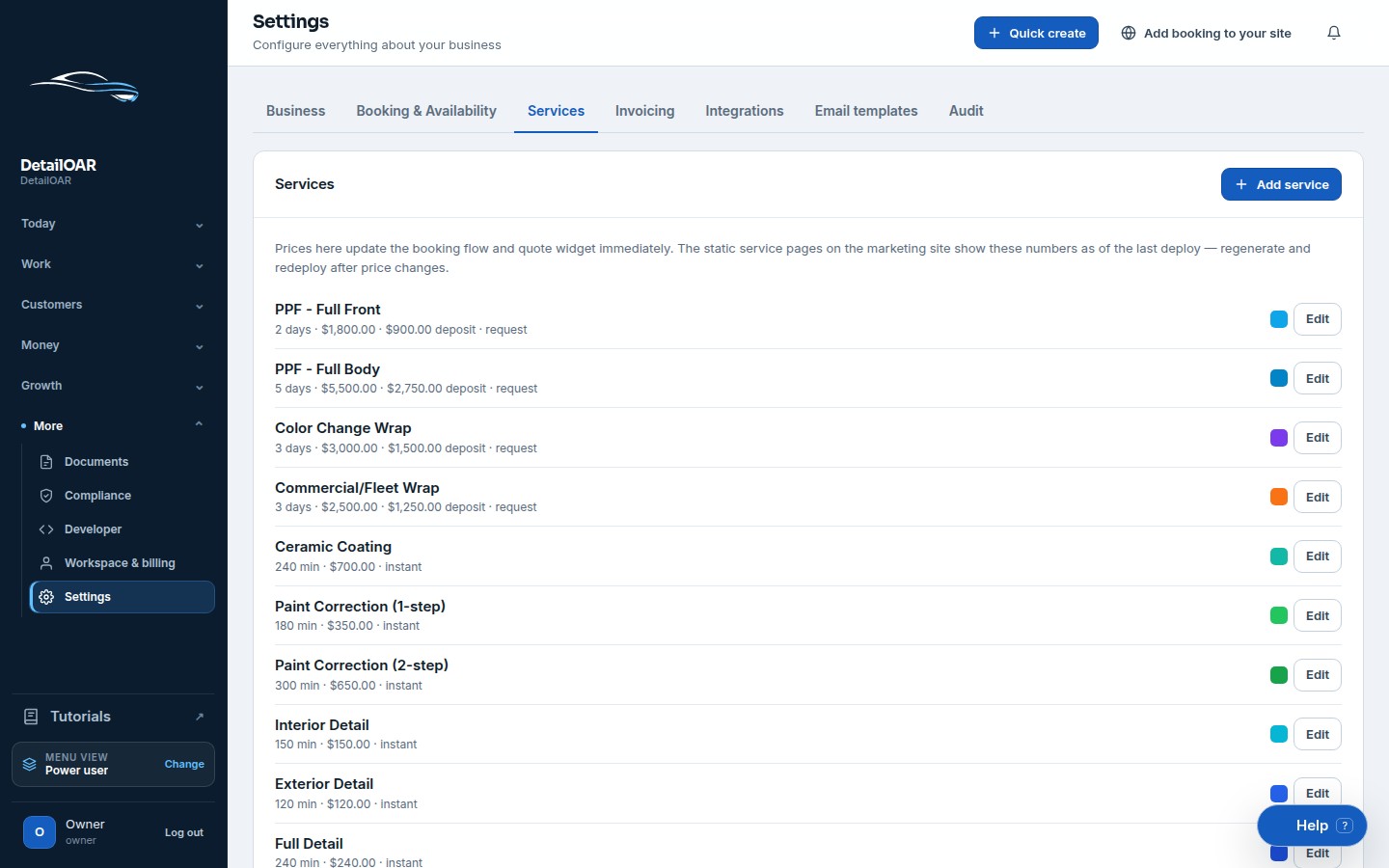
Open Settings, choose Services, then choose Add service.
Enter the customer-facing Name and a Description that spells out where the work stops — not just marketing adjectives.
Set Duration minutes for same-day work or Duration days for multi-day work, and count check-in, setup, cure, quality control, and handoff time.
Choose Booking mode: go Instant only when price, duration, capacity, and acceptance rules are predictable; pick Request for condition-dependent or multi-day work.
Enter Base price, Deposit, Color, and Sort order, then choose Save.
Reopen the service and double-check every saved value.
-
Step 2 Add vehicle-size prices
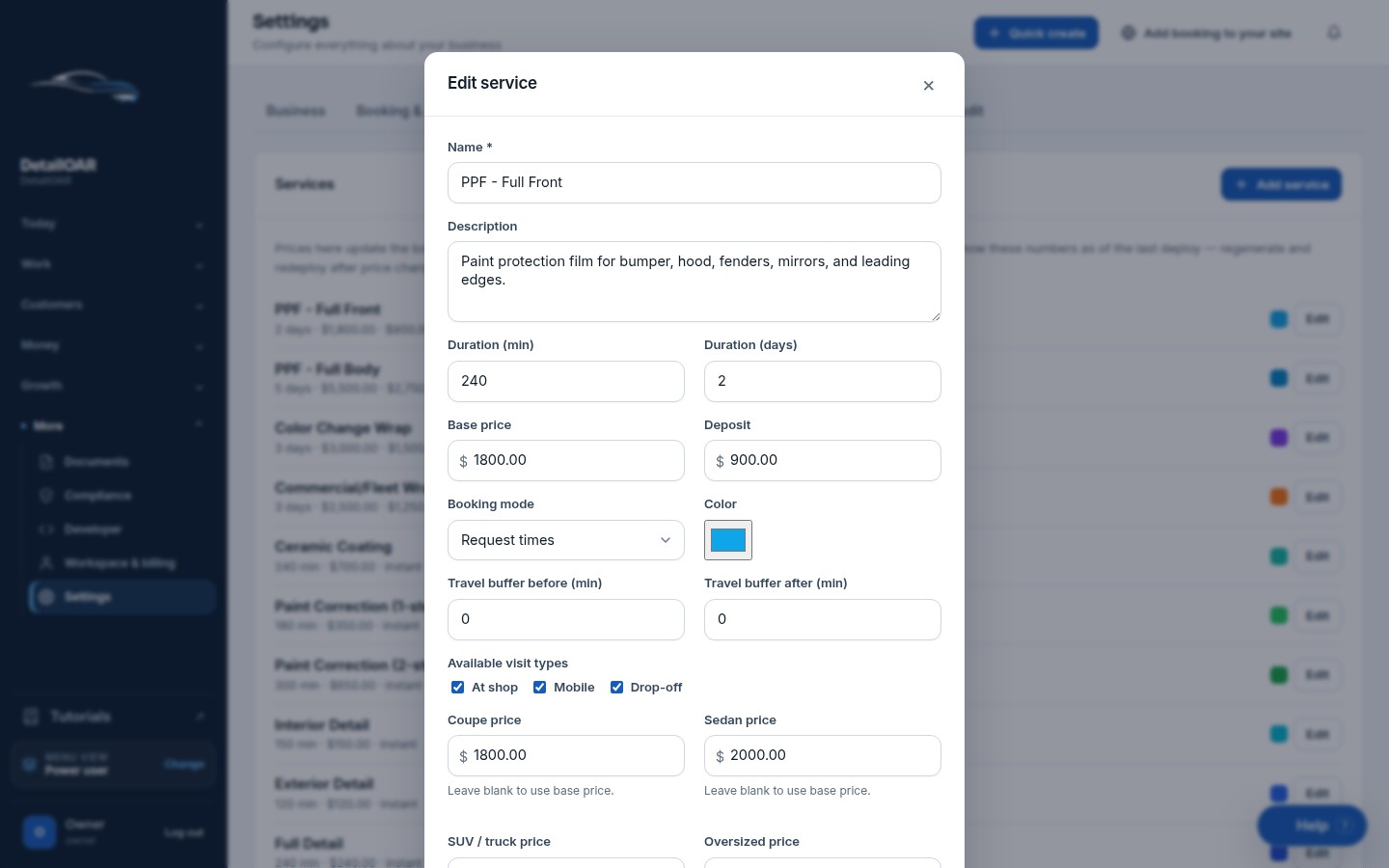
Open the service’s vehicle-size pricing controls.
 View full size
Enter a price for Coupe, Sedan, SUV/Truck, and Oversized where offered. Work from your pricing worksheet — don’t copy a competitor blindly.
Decide how staff should classify vans, third-row SUVs, lifted trucks, specialty vehicles, and unusually dirty ones.
Run one vehicle from each size class through booking or an estimate, and confirm the price snapshot follows the selected vehicle.
-
Step 3 Create add-ons and presets
In Settings choose Invoice presets, then Add preset.
Give it a specific Label such as Pet Hair – Additional Labor rather than Miscellaneous.
Add Description, Default amount, Taxable state, and Category.
Choose Save. In a draft estimate, add the preset and check staff can change quantity or amount when the real scope calls for it.
Keep condition adjustments explicit on the estimate, and talk them through before approval.
Reference
Use the detail when you need it.
Choose the right catalog level
- Service: the main scheduled unit — think Full Detail or One-Step Polish.
- Package: a clearly scoped bundle. If the current interface doesn’t expose package relationships, create it as a service under the package name and list what’s included in Description.
- Add-on: optional work that usually rides along on a main service. Create it as an invoice preset until the booking add-on selector is enabled for the workspace.
- Custom line: one-off labor or material dropped straight onto an estimate or invoice.
What good looks like
- A customer can tell the result and the boundary from the name and description alone.
- Duration actually protects the calendar.
- Instant-book prices cover every supported size class.
- Condition work never shows up as a surprise charge.
- Add-ons read as clear line items on the estimate and invoice.
Troubleshooting
- Service doesn’t show online: check it’s Active and that its booking mode isn’t intentionally request-only.
- Wrong price showing: check the vehicle’s size class and the service’s size-price row.
- Calendar overbooks: bump duration up or capacity down — pricing doesn’t protect time.
- Preset missing: confirm it saved, is still active, and is available to the selected estimate/invoice builder.
Finish
Check the result and close the loop.
Final checklist
- Names and descriptions make sense to customers.
- Duration includes non-production time.
- Booking mode matches pricing certainty.
- All vehicle-size prices tested.
- Deposits and presets tested on a draft.
- Catalog order reviewed on mobile.
More
Continue only where it helps.
Learning paths with this guide
Set Up DetailOAR8 guidesFrequently asked questions
Should every add-on be a service?
No. Reach for a service when the work needs its own schedule/capacity; use a preset or supported add-on when it normally rides on a larger job.
Can staff change a preset amount?
Yes, when permissions and the estimate/invoice builder allow it. Just explain any adjustment before the customer approves.
What if price depends on condition?
Use request-based booking, or a base estimate plus an explicit condition adjustment after inspection.
Sources and review
Reviewed by DetailOAR Product Team on July 15, 2026. Verify current labels, interfaces, prices, and local requirements before acting.
Related field guides
 Business FoundationsHow to Design a Profitable Service MenuBuild a small service menu with clear outcomes, firm boundaries, capacity that fits, sensible add-ons, and standards your crew can deliver.
 Business FoundationsHow to Price Detailing Services Without GuessingSet a price that holds up, built from labor capacity, direct cost, overhead, risk, and the owner pay you’re aiming for, then check it against real jobs.
 Software helpCreate Your Account and Business WorkspaceSpin up a tenant-isolated workspace, pick the right plan and business model, sign in, and confirm the owner session before any customer data goes in.