
DetailOAR Field Manual · Sales recommendations
How to Upsell Services Without Sounding Pushy
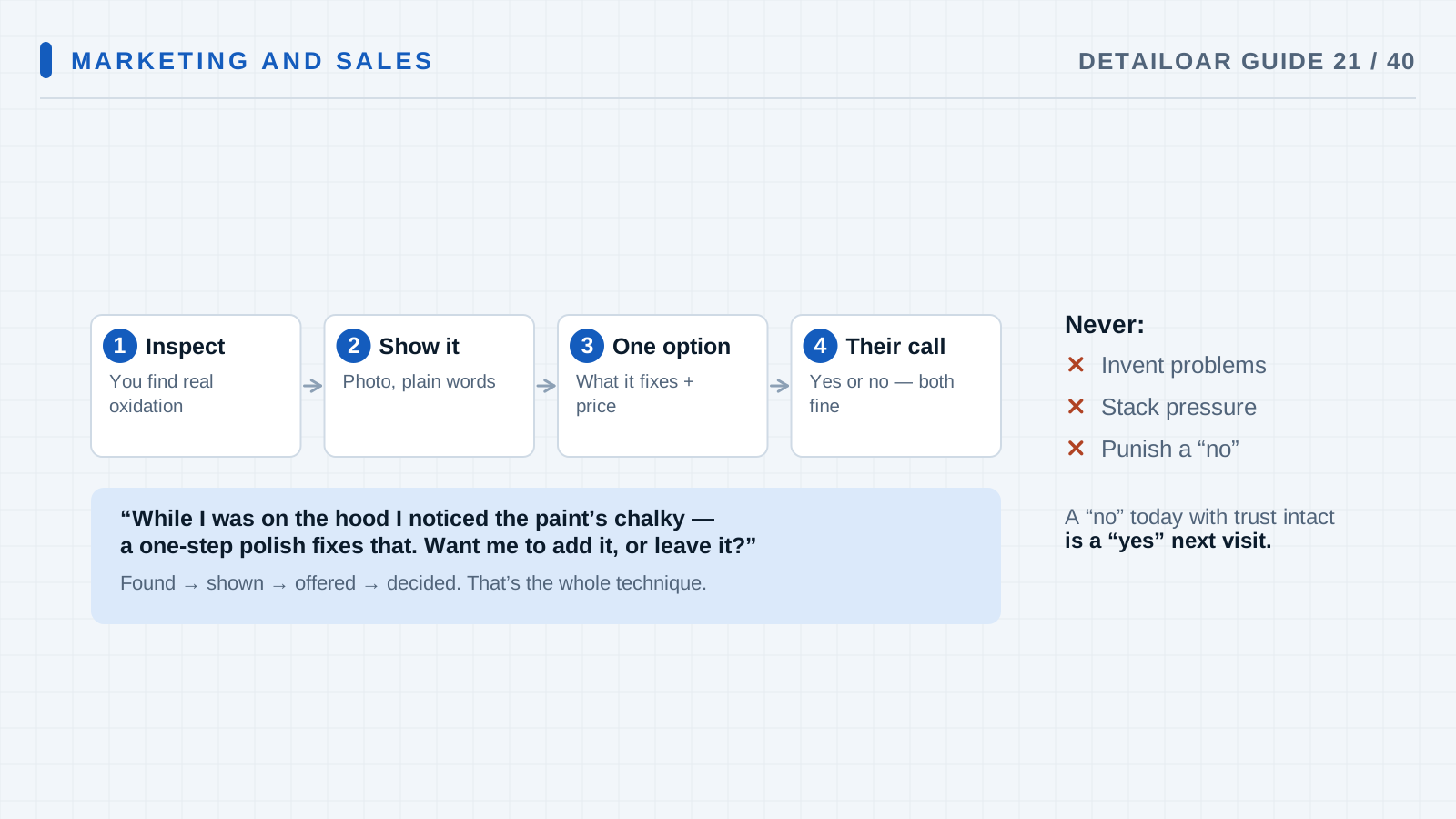
Recommend add-ons your inspection actually supports, walk through the tradeoffs, and keep no an easy answer while the original result stays protected.
Save or use this guide
Contents
Start
Know the outcome.
Set up evidence-based recommendation triggers and a short explain, ask, and respect-the-answer script for optional work.
Audience, time, and cost
Owners and advisers who either sit on helpful recommendations or bury customers under every add-on on the menu.
Time and costThe matrix takes an hour to build. A recommendation should add only minutes before any approved work.
Before you start
Price out and define every add-on: who it fits, when it’s a bad idea, the result to expect, and what it does to the schedule.
Tools and materials
- recommendation matrix
- inspection photos
- add-on scope and price
- decline-friendly script
Steps
Do the work in order.
-
Step 1 Define add-on eligibility
For each add-on, write down the customer goal, the visible trigger, required prep, when not to do it, price, time, and the result to expect.
-
Step 2 Inspect and prioritize
Flag only the conditions that touch the customer’s goal, and rank at most two recommendations.
-
Step 3 Ask permission to explain
Try: “I noticed [condition]. Would you like the option that addresses it?”
-
Step 4 Explain evidence and tradeoff
Show them the condition, then explain the optional process, the realistic result, the added time and price, and what deferring means, all without exaggeration.
-
Step 5 Offer an easy choice
Ask whether they want it added, want to keep the original scope, or want to revisit later. Don’t fill the silence with pressure or surprise discounts.
-
Step 6 Document the outcome
Put approved work on the estimate or a change order. Log declined recommendations only as neutral internal context, where that’s appropriate.
-
Step 7 Review quality, not only sales
Compare eligibility, acceptance, margin, time accuracy, complaints, and results. Retrain any recommendation that’s overused or misread.
Reference
Use the detail when you need it.
How it works
A good upsell is a diagnosis with an option attached, in service of what the customer already said they want. It keeps three piles separate: what the purchased result requires, what you’d recommend, and what’s pure preference. And the customer keeps a comfortable no.
Terms used in this guide
- Recommendation triggerSomething you can see, or a goal you’ve heard, that makes one optional service relevant.
- Attach rateThe share of eligible jobs that take an add-on. It’s a diagnostic, not a quota for pressuring customers.
Common mistakes
- Pitching the same add-on to every single customer.
- Labeling essential prep as optional.
- Selling with damage fear or fake scarcity.
- Starting work before the yes.
- Grading staff on add-on revenue alone.
Troubleshooting
- Customers keep getting caught off guardMove common eligibility and pricing details earlier into your booking and estimate copy, and ask permission before you explain.
- One add-on stretches every jobUpdate its duration and your schedule capacity. The price has to carry its real operational impact.
- Staff recommend it inconsistentlyTrain with photo examples, clear eligibility and when-not-to rules, and role-play taking a respectful no.
Finish
Check the result and close the loop.
What good looks like
- Every recommendation starts with evidence.
- Required prep lives in the base scope.
- Only one or two relevant options come up.
- Price and time are plain.
- Saying no feels safe.
- Approved changes land in the job record.
Final checklist
- Eligibility matrix written
- Price and time verified
- Two-recommendation limit set
- Permission script trained
- Change approval required
- Quality review scheduled
What to do next
- Fold approved add-ons into estimate templates.
- Use handoff to point at future maintenance instead of same-day pressure.
- Keep reading customer feedback.
More
Continue only where it helps.
Prerequisites
How to Design a Profitable Service Menu14 min readHow to Quote Jobs, Explain Value, and Handle Price Objections15 min readLearning paths with this guide
Get Your First 20 Customers9 guidesBuild a Repeat-Customer System5 guidesFrequently asked questions
Is an upsell unethical?
Not when it’s relevant, truthful, optional, fairly priced, and easy to turn down. Pressure and hidden requirements are what make it ugly.
How many add-ons should I present?
Usually one or two that matter most. Pile on more and you get decision fatigue and thinner trust.
Should technicians earn commissions?
If you go that route, build the pay plan so safety, accuracy, customer fit, and quality outweigh raw attachment, and disclose or manage conflicts properly.
Sources and review
Reviewed by DetailOAR Editorial Review on July 15, 2026. Verify current labels, interfaces, prices, and local requirements before acting.
Related field guides
 Business FoundationsHow to Price Detailing Services Without GuessingSet a price that holds up, built from labor capacity, direct cost, overhead, risk, and the owner pay you’re aiming for, then check it against real jobs.
 Detailing SkillsVehicle Check-In, Inspection, and Damage DocumentationA calm, repeatable check-in that confirms who and what you’re working on, records the condition the car arrived in, keeps media private, and gets acknowledgment before work begins.
 Marketing and SalesHow to Create Repeat Customers, Maintenance Plans, and Reactivation CampaignsBuild follow-up, rebooking, recurring maintenance, and respectful win-back campaigns around what the vehicle needs and what the customer agreed to.