
DetailOAR Field Manual · Lead response
Lead Response Scripts for Calls, Text Messages, and Direct Messages
Answer every channel fast with scripts that qualify politely, lock in the next step, and record consent, without ever sounding like a robot.
Save or use this guide
Contents
Start
Know the outcome.
Put short first-response, qualification, estimate, follow-up, and close-the-loop scripts in place, with clear escalation and opt-out handling.
Audience, time, and cost
Owners and staff who miss leads, fire off long questionnaires, quote blind, or let conversations trail off with no next step.
Time and costSetup runs about two hours. Each reply should be quick but never rushed; software and phone costs vary.
Before you start
Settle your service area, scope, starting-price approach, the photos you need, hours, who owns responses, opt-out handling, and when staff must escalate.
Tools and materials
- phone
- approved message templates
- CRM
- qualification questions
- service area and availability
- consent and opt-out rules
Steps
Do the work in order.
-
Step 1 Personalize one manual reply
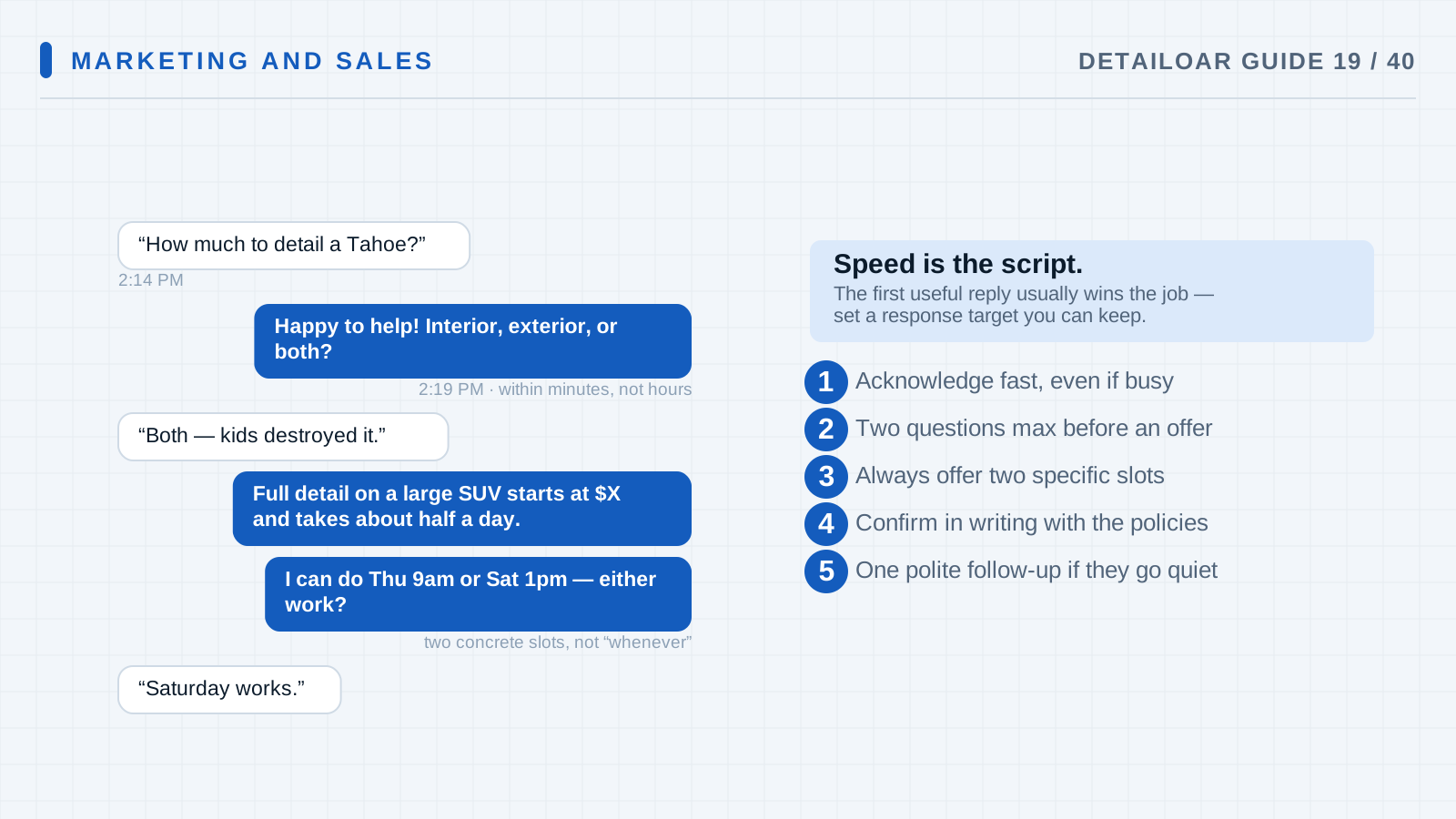
Open one real or practice inquiry and answer it as a person. Use the customer’s name and goal, then ask only for the vehicle, desired result, and ZIP code you still need.
-
Step 2 Set the response standard
Now name the owner of each inbox and the hours a real reply is available. Add backup coverage, escalation triggers, and a response target the team can actually meet.
-
Step 3 Use a call opening
Answer with: “Thanks for calling [business], this is [person]. What would you like to improve about the vehicle?” Listen, play it back, then ask about vehicle, condition, location, timing, and prior work as it fits.
-
Step 4 Qualify without interrogating
Ask one short cluster of questions at a time, say why you need photos or an inspection, and never ask for something they already told you.
-
Step 5 Set the next action
Offer: “Based on that, the next step is [booking/inspection/photos]. I can [specific option] by [time]. Does that work?”
-
Step 6 Follow up with context
Check consent, quiet hours, and opt-out status before any follow-up. Then send: “Hi [name], checking whether you still want help with [specific result]. I can hold [option] until [honest time]. Reply with questions, or tell me to close this out.”
-
Step 7 Close and log
Log source, qualification, consent, notes, estimate, next date, outcome, and why you lost it if you did. Confirm opt-outs and stop automations on the spot.
Reference
Use the detail when you need it.
How it works
A script is a reliable skeleton, not a speech you recite no matter what. The rhythm: acknowledge, clarify, recommend the right next step, confirm timing, log the outcome. Done well, the prospect feels heard and your scope stays protected.
Terms used in this guide
- Response timeThe clock from a lead’s inquiry to the first useful human reply or honest automated one.
- Next actionA specific step someone owns, with a time on it, like receiving photos or sending an estimate.
Common mistakes
- Dropping a ten-question wall of text.
- Quoting before you’ve confirmed vehicle and condition.
- Asking “How can I help?” after the lead just told you.
- Following up with nothing new and no way to close it out.
- Letting messages live only in someone’s personal account.
Troubleshooting
- Leads go quiet after your first replyTrim the ask to the smallest next question, and check that your reply actually spoke to the service they wanted.
- Staff sound roboticKeep the structure, but have them open with a one-sentence summary of the lead’s own goal before any template.
- Messages land after hoursSend an honest auto-acknowledgment with your hours and the next response window. Never fake a live human.
Finish
Check the result and close the loop.
What good looks like
- The first message is short and personal.
- Questions track what the customer said they need.
- Every conversation ends with a next action or a closed outcome.
- Templates get edited to fit the moment.
- Opt-outs and quiet hours actually get enforced.
- Private details move to approved channels.
Final checklist
- Channel owners named
- Hours and target set
- First-response scripts approved
- Qualification questions kept short
- Follow-up cadence approved
- Opt-out flow tested
- Outcomes logged
What to do next
- Build your estimate templates.
- Read your lost reasons every week.
- Automate only the stable, compliant steps.
More
Continue only where it helps.
Prerequisites
How to Design a Profitable Service Menu14 min readFrequently asked questions
How fast should I respond?
Set the fastest standard your team can hit reliably during stated hours. A useful, accurate reply beats an instant empty acknowledgment.
Should I send price in the first message?
If you know the scope, send fixed or starting pricing. If you don’t, say what photos or inspection you need and when the estimate will arrive.
How many follow-ups should I send?
Run a limited, documented cadence shaped by consent, channel, value, and applicable law. Then close the record instead of messaging forever.
Sources and review
Reviewed by DetailOAR Editorial Review on July 15, 2026. Verify current labels, interfaces, prices, and local requirements before acting.
Related field guides
 Marketing and SalesHow to Quote Jobs, Explain Value, and Handle Price ObjectionsTurn what you see on the vehicle and what the customer wants into a written scope, explain your recommendation, and take price pushback without arguing or discounting on reflex.
 Marketing and SalesHow to Build a Detailing Website That Turns Visitors Into LeadsBuild a fast, credible detailing site that answers the questions buyers actually have, shows real work, and points every visitor to one clear next step.
 Marketing and SalesHow to Create Repeat Customers, Maintenance Plans, and Reactivation CampaignsBuild follow-up, rebooking, recurring maintenance, and respectful win-back campaigns around what the vehicle needs and what the customer agreed to.